Cognitive Speed and Visual Association in Match It
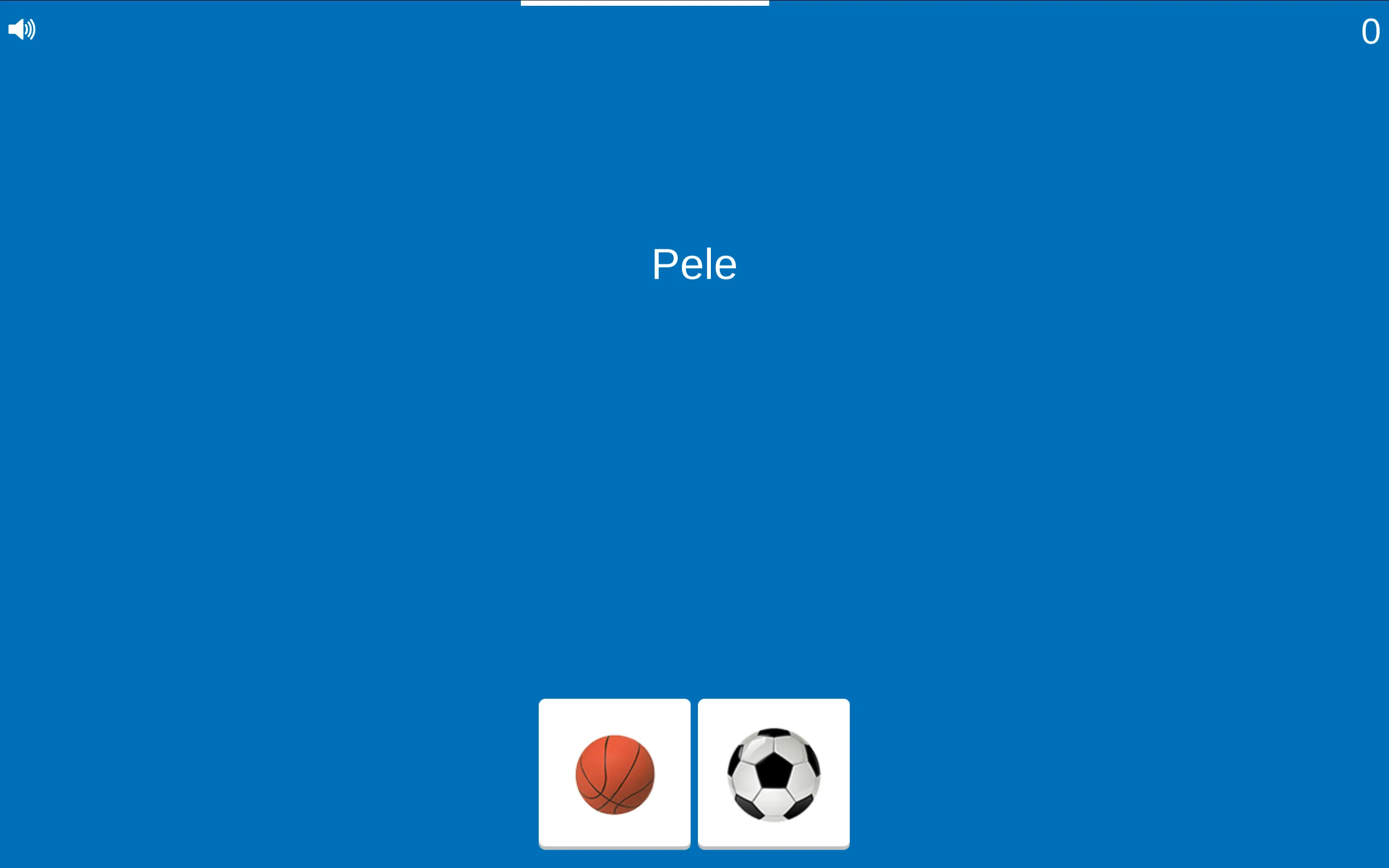
Match It strips trivia down to its most immediate cognitive elements: a single concept prompt and two competing picture cards. Displayed in crisp typography against a minimalist blue backdrop, the game presents a name, object, or term in the center of the display. Below the prompt sit two square photographic tiles. Your task is to identify the logical connection and tap the matching image before the white timer bar across the top of the screen runs dry.
The beauty of Match It lies in its wide associative breadth. In one moment, the game might prompt you with 'Pele', requiring you to choose between a basketball and a soccer ball. In the next breath, a prompt like 'Mammal' or a specific species name appears above cards displaying a chicken and a giant panda. The shifting contextual categories keep your brain firing on all cylinders.
Elimination Tactics and Cognitive Reaction Pacing
Surviving deep into double-digit streaks requires an efficient visual routine:
- Read First, Scan Second: Never look at the picture cards before reading the prompt word. Doing so floods your working memory with irrelevant visual data. Absorb the word 'Pele', categorize it internally as 'world-famous soccer icon', and then scan downward for the soccer ball.
- Binary Feature Elimination: When evaluating animal or object cards, look for defining physical characteristics. If a prompt specifies an avian species, immediately reject the four-legged furred animal on sight without needing to identify its specific species.
- Rhythm Preservation: The countdown timer provides roughly two seconds per prompt. Settling into a steady, rhythmic cadence prevents the anxiety that often leads to frantic misclicks when the timer approaches zero.

Optimizing Physical Setup for High Score Runs
Physical execution is just as critical as mental sharpness in Match It. On mobile smartphones, hold your device horizontally or vertically with both hands, positioning your left thumb over the left picture card and your right thumb over the right card. This dual-input stance eliminates thumb transit time, enabling near-instantaneous selections.
On desktop computers, center your mouse cursor in the narrow channel directly between the two bottom cards. From this neutral position, a short twitch of your wrist to the left or right delivers a swift, accurate click without drifting across the screen.
Associative Trivia and Speed Recall Insights
What categories of questions appear in Match It?
Match It draws from an extensive catalog of general knowledge domains, including world sports, geography, wildlife, everyday household tools, culinary ingredients, and famous historical personalities.
Does the timer speed up as your score increases?
While the timer bar grants roughly the same window on early questions, the mental demand increases as prompts shift from broad classifications (like sports balls) to finer semantic distinctions, making quick reading skills paramount.
What happens if you click the wrong card?
Match It operates on strict sudden-death rules. A single incorrect choice immediately concludes the run and brings up the Game Over screen displaying your latest score and personal record.
Can you review the questions you missed?
The Game Over screen remains overlaid on top of the final board state, allowing you to view the prompt and the two cards you were evaluating when the run concluded.